Redact names before cloud AI sees them
2026-06-05
Thoth does everything on your Mac. Transcription, speaker detection, and summaries can all run with five local AI models, no account, no upload. But local and cloud summaries are not equal. When I benchmarked them side by side, a frontier cloud model scored meaningfully higher, especially on dense technical meetings, and it was the only one to reliably capture decisions that were implied but never stated outright. So some people reach for cloud on the summaries that matter most, and Thoth lets them, using their own API key. The transcript goes straight from your machine to the provider. No Thoth server sits in the middle.
That is private in the network sense. Your data is governed by your agreement with the AI provider, not by a third party's terms. But there is one thing left to deal with: the words themselves. A transcript still contains real names, a client, a phone number, an address. A transcript of a sensitive conversation is the sensitive conversation.
Anonymization, arriving in Thoth 1.7, closes that last gap.
What it does
Before any cloud request, Thoth scans the transcript on your device and replaces identifying terms with neutral tokens. The model never sees the real values. When the response comes back, Thoth swaps the originals in again, so your summary reads naturally.
Here is what leaves your machine. The text on the left stays on device. The text on the right is what the cloud model actually receives:
Marie from ACME Corp called about the Helios contract.
Reach her at [email protected] or 06 XX XX XX XX.
[PERSON_1] from [ORG_1] called about the [KEYWORD_1] contract.
Reach her at [KEYWORD_2] or [KEYWORD_3].
The model gets the structure of the conversation without the identities. The summary it writes lands back in Thoth, the tokens are restored, and you read it with the real names in place.
How it finds things, all on device
Four sources run locally, and nothing about this step touches the network.
| Detected on device | Example | Becomes |
|---|---|---|
| People | Marie Dupont | [PERSON_1] |
| Places and addresses | 10 rue de la Paix, Paris | [PLACE_1] |
| Organizations | ACME Corp | [ORG_1] |
| Phone, email, URL | 06 XX XX XX XX | [KEYWORD_1] |
| Your own terms | Project Atlas | [KEYWORD_2] |
The first three come from Apple's Natural Language framework, which recognizes names, places, and organizations. That model is good at names, but by design it sails past structured identifiers. A phone number is not an "entity" it knows about, and yet it is often the most identifying thing in a transcript. So Thoth runs Apple's data detectors alongside it to catch phone numbers, postal addresses, emails, and URLs. Dates are deliberately left alone: they are everywhere and rarely identifying, and masking every "Monday" would gut the context the AI needs.
You can add your own terms too, the things no detector could know are sensitive: an internal project name, a deal, a product that has not shipped. Those are always masked.
Apple Intelligence can suggest terms
On devices that support it, a single button asks the on-device Apple Intelligence model to read the transcript and propose terms worth redacting, sorted into people, places, and organizations. It runs in windows sized to fit the model, entirely on your Mac, and it only suggests. Nothing is added until you tap a suggestion. It is there to widen the net on the things heuristics miss, while a strict check against the transcript keeps it from inventing names that were never said.
You see exactly what leaves
None of this is automatic-and-trust-us. Before anything is sent, Thoth shows you a review screen: every term it found, grouped by type, and the full transcript with the tokens in place so you can read precisely what the cloud model will receive.
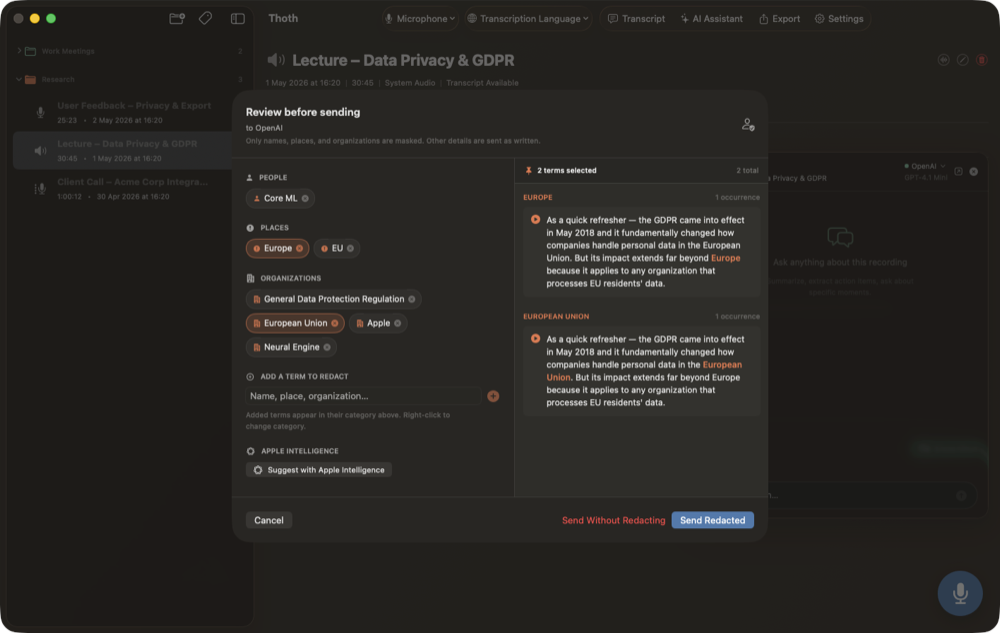
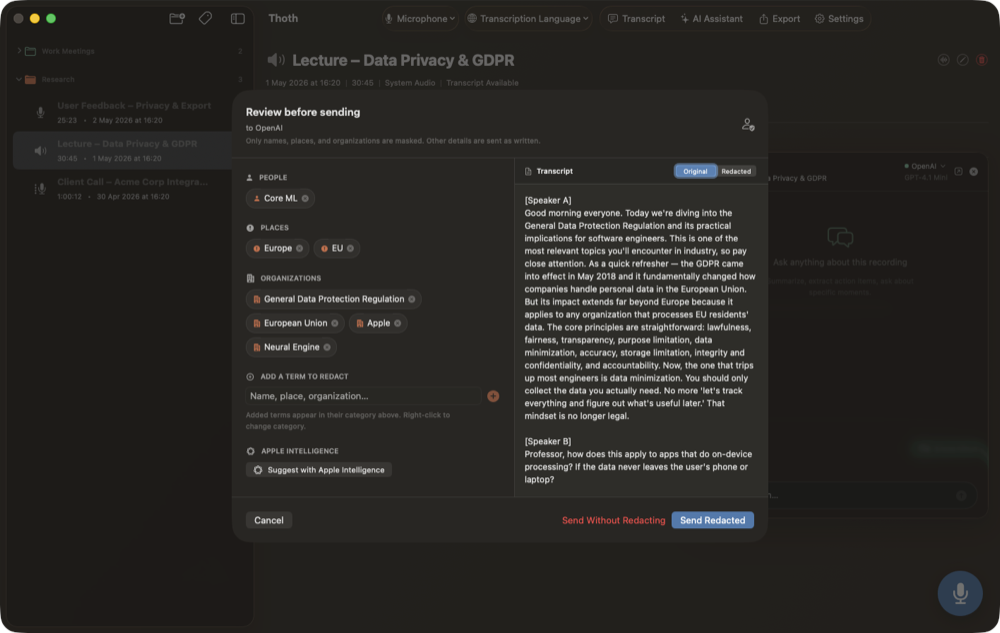
From there you can:
- Remove a term you would rather send as written.
- Add one the detectors missed.
- Change a term's category.
- Correct a name the transcription misheard, which also fixes it in your saved transcript.
- Play the audio at each spot a term appears, to check the context before deciding.
Nothing is sent until you press Send Redacted. If you would rather send the transcript untouched, that is a separate, explicit choice.
Why the review step exists
Entity detection is not perfect, on any platform. It misses, and ASR mishears. A tool that detected names and silently trusted itself would leak the ones it got wrong and give you no way to know. So the design is the opposite: detect widely, then put you in front of the result with everything you need to verify and fix it. The suggestions widen coverage, the review step gives you the final say, and the token restore means the safer choice does not cost you a readable summary.
Coming in 1.7, on Mac first
Anonymization lands in Thoth 1.7, on the Mac first, with the same engine in the upcoming iPhone and iPad app and the same review screen adapted to touch. Wherever you record, the rule is the same: you decide what leaves, and you can see it before it does.
Thoth is a private AI scribe for Mac that transcribes, diarizes, and summarizes on your device. Audio never leaves your machine, and with version 1.7, neither will the names in your transcript, unless you choose to send them. Built by one person, no funding, no team. If you find it useful, upgrading to Pro is the best way to support development.