Thoth is coming to your menu bar
2026-05-18
In v1.3, I added the detachable live transcript window based on user feedback: people wanted to keep the transcript visible while switching between apps during a meeting. It shipped, and it worked well. But it still required the main Thoth window to be open.
Menu bar mode takes that idea further. Thoth lives in your menu bar. The main window never has to open.
Starting a recording
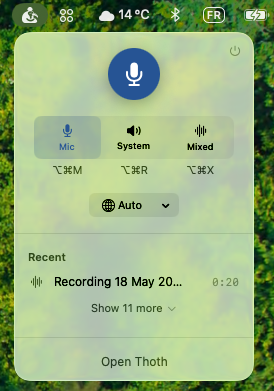
One click on the menu bar icon opens this. A large mic button, three recording modes (Mic, System, Mixed) with their keyboard shortcuts, and a language picker covering all 99 supported languages. Your recent recordings are listed below, each one a single click away from the AI actions panel.
There is also a meeting detection nudge. When Thoth sees a native meeting app open (Zoom, Teams, and others), a small banner appears with a Record button that starts immediately in the right mode.

One thing worth being upfront about: this only works with native meeting apps. If you use Google Meet or Zoom in a browser, Thoth cannot detect it. Web-based meetings look like any other browser tab from the outside.
While recording
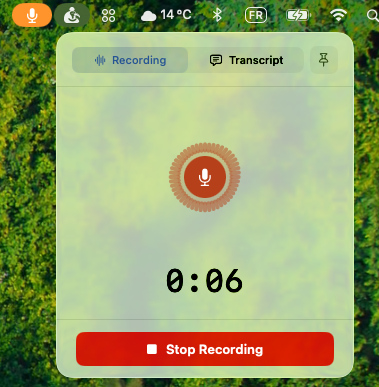
Once recording starts, the popover shows a large timer and an animated audio visualizer. In Mixed mode (mic and system audio simultaneously), the visualizer shows both levels separately so you can confirm both sources are active.
The menu bar icon turns orange, so you always know a recording is running even when the popover is closed.
Live transcript, and the pin
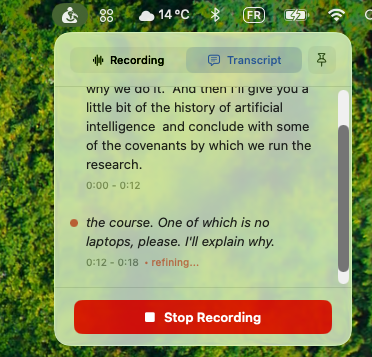
Switch to the Transcript tab and the live feed appears right in the popover. But the more useful thing is the pin button in the top right corner.
Tap it, and Thoth opens a compact floating window that stays on top of every other app. It follows you across all Spaces. It works in fullscreen apps. You can drag it anywhere on screen. This is the evolution of the detachable transcript from v1.3: instead of a window that competes with your other apps, it is a lightweight panel that genuinely stays out of the way while remaining visible.
The popover closes automatically when the floating window opens, so you are not managing two things at once.
After the recording
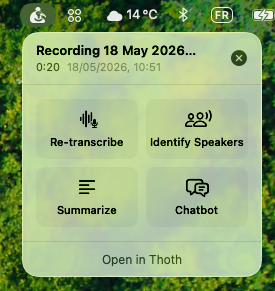
When you stop, the popover shows the four main AI actions: Re-transcribe, Identify Speakers, Summarize, and Chatbot. Each opens a focused window for that task. If you want the full view, Open in Thoth takes you there with that recording already selected.
For a short meeting or a quick interview, you may never need the main app at all.
When it ships
Menu bar mode is fully built and will ship in the next update after v1.4 clears App Store review. You can follow progress on the roadmap.
Thoth is a private meeting recorder for Mac. All transcription runs on your device. Built by one person, no funding, no team. If you find it useful, upgrading to Pro is the best way to support development.